
"How come I didn't know about it?"
"Of course, it can. Where have you been liv..."
I didn't wait long enough to hear to rest of my friend's sarcasm. I was head down busy setting up my iPhone for tethering. I need these to do tethering:
- iPhone OS 3.0 or higher (checked)
- Confirm your network carrier support tethering. Telstra supports this. (checked)
- 3G network (checked)
- phone update with the latest setting from the carrier (checked)

- On iPhone, select Settings -> General -> Internet Tethering -> Internet Tethering. Then select "On". See the screenshot. Oh, while at the setting screen, make sure Bluetooth is on.

- Make sure the Macbook's bluetooth is on. Recommend to show Bluetooth icon on the menu bar
- Right click Bluetooth icon on the menu bar, then select Setup Bluetooth Device
- Wait until your iPhone appears on the Browse Device window, then click Continue
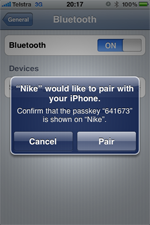
- Macbook will popup Bluetooth pairing window with the passcode
- Your iPhone should display Bluetooth pairing window with the same passcode
- Click accept on your iPhone. Now for some reason, this process would fail several times. I cannot explain why. However, I just kept repeating this process 5-6 times and eventually it succeed. I went to the extra length of undo everything, remove all devices and etc and start this whole process again. Same result.
- When you finally pass the above process, i.e. it said that the pairing was success, now comes the fun bit
- From Macbook, right click the bluetooth icon.
- Select your device
- Select Connect to Network
- Your iPhone should display a blue bar with the word "Internet Tethering" on
- Have fun

- Watch out your data plan. Make sure that you won't go over limit
- Watch out your iPhone's battery consumption. That precious juice can be gone very quickly
- I notice that, if you connect your iPhone to the USB, tethering comes on automatically! I had to disable Tethering when I am at home or already have wifi connection.
