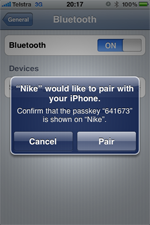
iPhone *CAN* do tethering!

"It can?!!"

"How come I didn't know about it?"

"Of course, it can. Where have you been liv..."

I didn't wait long enough to hear to rest of my friend's sarcasm. I was head down busy setting up my iPhone for tethering. I need these to do tethering:
  • iPhone OS 3.0 or higher (checked)
  • Confirm your network carrier support tethering. Telstra supports this. (checked)
  • 3G network (checked)
  • phone update with the latest setting from the carrier (checked)
Then turn on Tethering on your iPhone:
  • On iPhone, select Settings -> General -> Internet Tethering -> Internet Tethering. Then select "On". See the screenshot. Oh, while at the setting screen, make sure Bluetooth is on.
    Now from my Macbook (running OS X 10.6.3):
    • Make sure the Macbook's bluetooth is on. Recommend to show Bluetooth icon on the menu bar
    • Right click Bluetooth icon on the menu bar, then select Setup Bluetooth Device
    • Wait until your iPhone appears on the Browse Device window, then click Continue
    • Macbook will popup Bluetooth pairing window with the passcode
    • Your iPhone should display Bluetooth pairing window with the same passcode
    • Click accept on your iPhone. Now for some reason, this process would fail several times. I cannot explain why. However, I just kept repeating this process 5-6 times and eventually it succeed. I went to the extra length of undo everything, remove all devices and etc and start this whole process again. Same result.
    • When you finally pass the above process, i.e. it said that the pairing was success, now comes the fun bit
    • From Macbook, right click the bluetooth icon.
    • Select your device
    • Select Connect to Network
    • Your iPhone should display a blue bar with the word "Internet Tethering" on
    • Have fun
    Now a bit of warning:
    • Watch out your data plan. Make sure that you won't go over limit
    • Watch out your iPhone's battery consumption. That precious juice can be gone very quickly
    • I notice that, if you connect your iPhone to the USB, tethering comes on automatically! I had to disable Tethering when I am at home or already have wifi connection.

        Wonders of FengShui - House on the lower ground level

        Today, I was dragged by a friend to inspect residential properties with her as she's keen to purchase one soon. Since I know a little bit of Fengshui, she thought it'll be of great help to her if I could come along.

        Here we are at property #1. This is a very large property with 4 bedrooms and 2 bathrooms, double carport and a large rear backyard. This property was decorated to sell. All the lights were turned on, soft music was playing in the background, a huge, flat screen TV was turned on, and a beautiful fish tank was displayed in the lounge room.

        As I walked down the driveway towards the front door, I couldn't help noticing that the house is way below the level of the road. It just doesn't feel right. To me, this implies that if she lives in that house, her views (generally) will be obscured and also other people's "rubbish" (figuratively speaking) will gather at her front door.

        Now, she's back on the hunt again.


        iPad and 3G No Contract Data Plan

        This is from Apple's Australia website this morning:


        Apple - iPad - Stay connected everywhere you go.: "Here’s how to get 3G service for your iPad:

        1. Purchase your iPad with Wi-Fi + 3G.
        2. Get a micro-SIM card either from Apple or from a carrier offering iPad data plans; you’ll select your data plan later.
        3. Install your micro-SIM card.
        4. Use the on-device activation process (where available) or contact your wireless carrier for activation details."

        The best part is No Contract Data plan. To be available from Telstra, Optus, 3 Net, and Vodaphone.
        The follow paragraph from Apple FAQ page interests me:
        Apple - iPad FAQs
        Can I use my current iPhone service plan with the iPad?
        In general, cellular and data plans for iPhone are separate from iPad data plans. Depending on your carrier, you may have the option to add a 3G data plan to your existing iPhone plan. Check with your local carrier for details.

        iPad Wifi Vs. iPad 3G (Round 2)

        One more day! Tomorrow, I can order my iPad online. Yet, I still don't know which one to get.

        "For me, it's the iPad Wifi, man", my other friend suggested.

        He added, "Me, iPad Wifi -> Android Tethering -> The Net", he added with a wink as he had all things in this world figured out.

        "Meh," was my reply.

        Me and Android! No way in this world! No way I will ever leave my beloved iPhone. Beside, I feel forever am obligated and faithful to Mr. Jobs. Me flinging with Android is not going to happen. Beside, I don't have time to re-learn coding with Android.

        Since I will never go for Android, and since iPhone OS would probably never do tethering, there is only one choice if you require always-on internet access. One point (+1) to the iPad 3G.

        Current scores:
        iPad Wifi: 1
        iPad 3G: 2

        Grilled Chicken Wings


        Have you ever tried Thai style grilled chicken wings using your oven? Here's a simple recipe that will make your neighbours green with envy as it not only tastes good but smells wonderful.

        1 kg chicken wings
        2 tbsp premium light soy sauce
        1 tsp dark soy sauce
        1/2 tsp of ground black pepper
        2 garlic cloves, crushed
        1 tbsp extra virgin olive oil

        Using your hands, mix the above in a large bowl for a few minutes and then leave in the fridge for about 1 to 2 hours.

        Line baking tray with baking paper, pour the marinated chicken wings into tray and then put in the oven to cook at about 160 degree celsius (using fan-forced oven) for about 20 minutes and then turn the wings and continue cooking until evenly golden brown.

        These chicken wings can be served as is or on a plate with steamed rice and vegetables of your choice.


        A perfect plan for my iPad


        Telstra Unveils iPad Data Plans | Lifehacker Australia: "All the Pre-Paid Sim For Apple iPad plans have data which expires after 30 days if you don’t use it, but the lack of a contract makes the deal much more appealing for users who anticipate a mix of 3G and Wi-Fi use and don’t want to be stuck with endless monthly data updates. The cheapest $20 recharge offer 1GB of data. $30 gets you 3GB, $60 offers 6Gb, $80 9GB, and $100 12GB."

        iPad Wifi Vs. iPad 3G (Round 1)

        2 more days before I can order for my iPad (online). I still have not made up my mind between wifi version against 3G version. So question that often annoyed my friends (who are buying iPad) is which one they would buy.

        I had a morning coffee with my friend who is a property developer this morning and this same conversation came up.

        "It's definitely the 3G", my friend said.

        My friend is a very active property developer. He inspects property at least 5-8 properties each week. He complained a lot about how the other days he was driving around inspecting properties and had to switch around between checking Google map, street-view, emails, search properties online and reading legal documents.

        "I was in my car, then I had to turn on my macbook, plugged in the 3G dongle, and yada yada, It was so inconvenient". He swore swore swore and continued, "After checking the street view, I called up the realestate agent to send in section 32. I had tight space in my car so I had to turn off my mac. It took freakin' long time before my mac is safe to toss around. Then my phone beeped that I had an email, so I had to turn my mac back on to read an email, and then plugging in this 3G dongle thingy thing again. yada yada yada,"

        I didn't care to listen to all of it but I could picture his frustration. I can see already that the iPad 3G will be perfect for my friend (and myself?), big screen to see the map/street view, no annoying extra USB 3G dongle, quick start/sleep time, and almost always online (where ever there is coverage).

        His argument aside, for me, I am a nerdy programmer, I love my macbook. I need a full size QWERTY keyboard. If I were to buy iPad, a wi-fi one should be just fine for me. I can always share network access from my macbook. Plus it is AUD$ 130 cheaper and I don't think my personal financial officer will approve another mobile phone contract.

        In the end, for this fight:

        iPad 3G: +1 point
        iPad Wifi: +1 point

        A tie for this match and I was back to square one again. I still have 2 more days to think about this.

        Friday Fun: Corporate Structure

        Found passing around in my company email this morning:


        Accompanying message read:

        "When top level guys look down, they see only shit;
        When bottom level guys look up, they see only assholes..."

        Review: Runmeter GPS Running Stopwatch for iPhone

        My running preparation saga was completed:
        • Good pair of legs - one with titanium plate (checked)
        • an iPhone (checked)
        • an armband for iPhone (checked)
        • Highly endurance handsome body (checked checked checked)
        • And last but not least, a software to track my running progress - Runmeter (checked)
        This was the first time I ran again in 3 years after the motorcycle accident - hence the titanium plate. During this time I gained over 7 kg. I was a round fluffy ball, my partner said. That was the last straw.

        Three months ago I started slow jogging. The first one was only 4 km. I survived. I jogged 2 days a week for 2 weeks. My average speed was at 9+ min/km. Everybody was running pass me.

        I needed to speed up and run faster.

        So I started looking for a software that I could use to track my progress. After comparing feature by feature, I picked up this one from the AppStore - Runmeter GPS Stopwatch by Abvio LLC for $AUD 5.99. However, I didn't have the armband with me.

        Then it was Easter holiday. Over the Easter holiday, I went crazy and ran (no longer jog) everyday continuously for 4 days in a row. Using my stopwatch I was quite proud at my speed at 8+ min/km. However, couple of people were still passing me.

        With the arrival of the armband, I could take my iPhone with me and got to try Runmeter. Then the whole running saga was changed. There was this lady by my arm that kept on nagging me.

        "Distance 0.5, Time 5 50, average 9, remaining xxx"
        ...
        "Distance 1, Time 6 00, average 8.5, remaining yada yada"
        ...
        "Distance 1.5, Time 6 08, average 8.6, ..."

        This lady was screwing up my pace. My running pattern changed as I tried to please her. I knew when I started to dropping out, getting lazy, etc. Then I ran faster and faster. In my mind, I was thinking that it was good I have the phone with me. If I were to pass out, at least I hope I could dial 000 before I dropped.

        Using Runmeter was very easy. I never have to lookup the manual. Simply select "New Route" and hit the big green Start button then started pounding the pavement.

        At the end of my first run, I can review the GPS map and rename the route. The next run, I simply selected the same route and hit the start button and started running again. Runmeter automatically recognised the route and started criticising my performance.

        The stats became more and more interesting as you collected more data - more runs. I was at the stage where I couldn't wait for the next run to beat my own record.

        Before Runmeter, I strangely suspected that I ran uphill faster than downhill. Runmeter graph confirmed this. I guessed this was because when I ran downhill I thought that my plate was hurting. Anyway, I slowly corrected this mental thinking. These days I ran downhill as fast as running uphill.

        Runmeter does a very good summary. It shows summary in term of daily summary, weekly, monthly, yearly, or overall statistics.

        One feature I like quite a lot is sending updates to Twitter or Facebook. I set it up such that it wasn't too chatty and only tweeted at the begin and end of my run. I start running quite early like 5:30 am in the morning. At least, my partner could check where I was in the early hour and that I didn't have a close encounter of the 4th kind.

        The amount of info in the announcement is a lot. Runmeter is flexible enough and allow you to tune this up or down. In the beginning, Runmeter's lady was babbling quite a lot and people started give me weird looks. So I tuned her down a bit.

        Without appearing as doing promo ads for Runmeter (which I didn't), I quite like Runmeter and always use it for every run to improve my progress.

        These days, I run at 7 minutes per km, 8 km per run, and 3-4 days per week. Nobody can run pass me now. Nobody. Except one little girl! She was not running. She was sprinting! Anyway I suspected that she was actually a robot and not a girl girl. A robot in a girly form to make me feel bad.

        My ultimate goal is to use Runmeter to improve my running even further, like down to 6 minute/km to beat that little robot girl.


        Oh, BTW, I have shed all those 7 kg and need to go shopping for new clothes soon.

        Happy running.

        Living Earth Simulator hopes to unlock secrets of the past, present, future

        Living Earth Simulator hopes to unlock secrets of the past, present, future

        At a cost of $1.5bn, the Living Earth Simulator will gather as much data about humanity as possible, mining every available source to produce a picture of where we're at and where we're heading.

        Did they say the computer name is Sky Net?
        And isn't the answer always 42?

        Evernote + Twitter Integration - Perfect Combination

        I prefer Twitter to Facebook and am a huge fan of Evernote. I found that I like to jot little notes here and there as micro-blogs on Twitter. I also write big notes in Evernote. Often I felt something is missing, i.e., ability to search my tweets without having to log on to Twitter or ability to convert my micro journal into a big one.

        Then 3 days ago, when visiting Evernote's website, I discovered that they have integrated with Twitter.

        Perfect marriage!

        Setting up is simple for non protected Twitter account:
        • Log in to Twitter
        • Follow myEN
        • myEN will follow you back
        • myEN will send you a DM which contain a link back to Evernote
        • Once received the DM with a link, click on the link and log on to Evernote then complete the rest of the process
        For Twitter's protected account, things can be a little tricky:
        • Log in to Twitter
        • Follow myEN
        • myEN will follow you back, you will have to approve its request
        • You DM myEN
        • myEN will send you DM which contains a link back to Evernote
        • Once received the DM with a link, click on the link and log on to Evernote and complete with the rest of the setup process
        You are done!

        Now using it.

        Each time I want to keep a record or to remind myself of something, simply tweet as usual but insert @myEN anywhere in the text, i.e see screenshot above.

        From my experience, depends on your setting, it takes between 3-5 minutes to sync tweets to your Evernote's inbox.

        I also found it very convenient to quick search Evernote (using CMD+CTRL+F) with "@myen" keyword and have Evernote lists all my tweets. Then, you can move them or merge them at the end of the day into your archive folder.